

前言
博主某天在查看自己 DN42 的 Looking Glass 时, 发现几个用于 ASN 内传输路由的 iBGP 协议全部处于 Connection closed 状态, 导致了 ASN 内部无法正常传输路由. 在检查了各项配置且尝试重启无果之后, 意识到这貌似并不是什么简单的问题, 遂尝试解决.
网络状态
- 各节点 BIRD: 正常
- iBGP 节点间通信: 正常
- iBGP Peer 协商: 不正常
网络架构描述
iBGP Peer 一共有五台设备, 一台设备处于境内, 与其他四台设备建立 Peer, 其他四台设备处于境外, 这四台设备之间互相不 Peer. 且每台设备都与若干 eBGP 节点进行了 Peer.
已确认的部分
- iBGP 节点间 ASN 相同
- iBGP Peer 的 IP 地址配置无误
- 节点间防火墙配置无误
问题分析
iBGP Peer 不成立通常可能是以下几个原因导致的
Router ID冲突- Peer IP 地址不匹配
- TCP MD5 密码不匹配
- 使用
LoopBack建立连接时, BGP 多跳未配置 - 监听地址与端口不匹配或配置错误
- 某一方 BGP 会话未启动
Hold Time协商问题
下面我们一个一个进行分析
由于这些 iBGP Peer 的情况都大致相同, 且配置也大致相同. 因此每一步的验证仅取其中一对 Peer 进行查看
Router ID 冲突
对双方 Router ID 进行检查
VM-Sub
root@VM-Sub:/etc/bird/ibgp# birdc show status | grep "Router ID"
Router ID is 172.23.66.97
JPSB01
root@JPSB01:~# birdc show status | grep "Router ID"
Router ID is 45.xxx.xxx.xxx
可以明显看出, 双方 Router ID 不同, 故不是此问题
Peer IP 地址不匹配
现在对双方在配置文件中的 Peer IP 进行检查
VM-Sub
root@VM-Sub:/etc/bird/ibgp# cat sb1-jp.conf
protocol bgp 'ibgp_sb1-jp' from ibgpeers{
    neighbor 10.0.64.103 as DN42_OWNAS;
};
JPSB01
root@ACCK-JPSB01:/etc/bird/ibgp# cat homelab-subserver.conf
protocol bgp 'ibgp_homelab-subserver' from ibgpeers{
    neighbor 10.0.64.4 as DN42_OWNAS;
};
双方的 IP 地址均为 WireGuard VPN 内网中的 IP 地址, 因此互相连接时, 源 IP 地址肯定是 VPN 网络中的 IP 地址, 因此不是这个问题.
TCP MD5 密码不匹配
iBGP Peer 间未单独配置密码, 故不是该问题
使用 LoopBack 建立连接时, BGP 多跳未配置
iBGP 使用直连连接, 未使用 LoopBack 接口, 连接只有一跳, 故不是该问题
监听地址与端口不匹配或配置错误
监听地址和端口均为进行修改, 所有配置为 BIRD 默认, 故不存在该问题
某一方 BGP 会话未启动
双方 BGP 会话均启动, 故不是该问题
深入排查
现在, 所有可能的原因都排查完了, 但问题还未解决. 还剩怎么排查呢? 我们可以抓包查看具体通信报文是什么. 这里使用 tcpdump 对 179 端口进行监听, 并输出 pcap 文件
tcpdump -i any port 179 -vvv -s0 -w bgp.pcap等待一段时间后, 使用 Wireshark 打开该文件查看报文
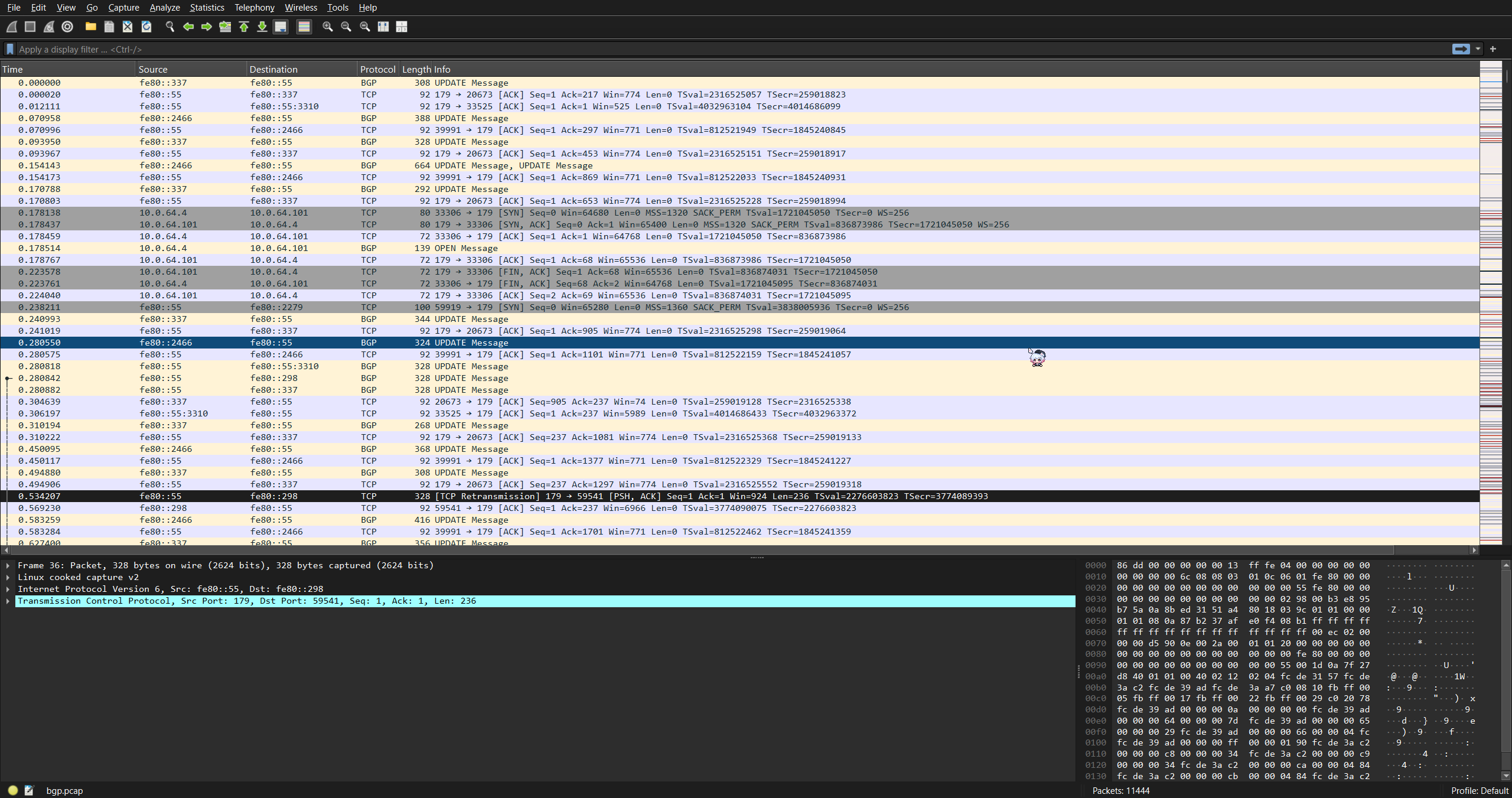
ip.addr == 10.0.64.4 && ip.addr == 10.0.64.103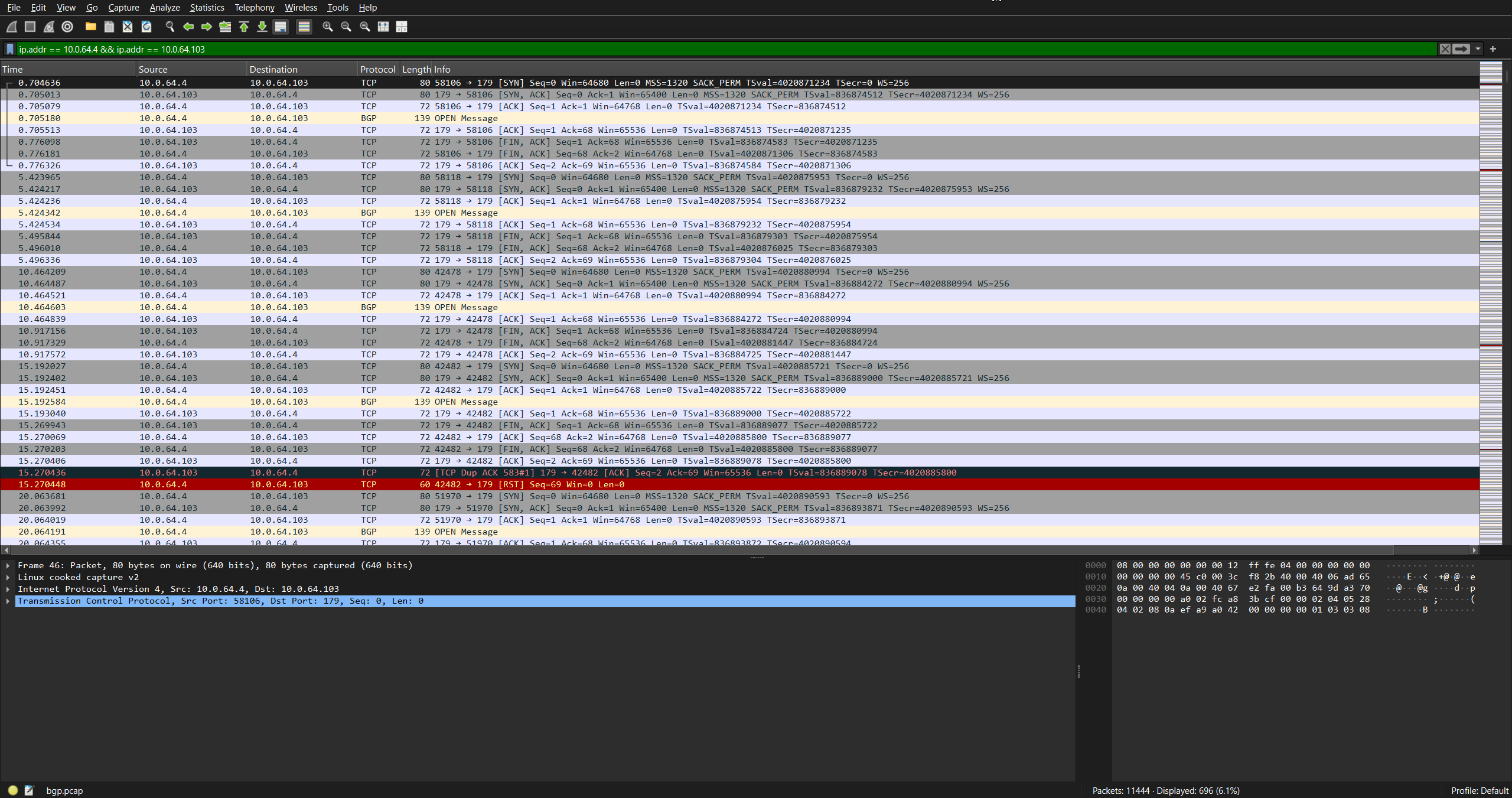
10.0.64.4 多次尝试向 10.0.64.103 发送 OPEN 报文, 但最终会被 10.0.64.4 发送 RST 报文, 整个连接被重置, 最终导致 BIRD 报错 Connection closed.
现在, 我们重新在 10.0.64.103 上进行抓包, 结果如下

10.0.64.4 还是 10.0.64.60, 均只对对方的 TCP 报文进行了处理, 没有任何 BGP 层的处理. 这很奇怪, 如果问题出现在 BGP 层, 那么应该由其中一方发送 BGP Notification 报文来终止连接, 而不是 TCP Reset.
鉴于这个问题是突然出现的, 所以我们来审视一下问题出现的前后, 我都对网络做了什么改动. 回想了一下, 在这期间我对网络做的唯一改动就是 将 EasyTier VPN 的部署从 直接在 systemd 服务中将具体配置参数输入给 EasyTier 二进制程序 改为了 通过将具体配置写进配置文件再送给 EasyTier 处理. 在配置文件中, 我多加上了这么几条参数
[flags]
enable_kcp_proxy = true
enable_quic_proxy = true
latency_first = true
private_mode = true
我们逐个检查这些 flag 会实现什么功能
enable_kcp_proxy启用 KCP 代理. 将 TCP 连接使用 KCP 协议进行代理
该功能虽然会改变 TCP 流量的传输方式, 但不改变原始 TCP 报文, 所以不会造成影响.
enable_quic_proxy启用 QUIC 代理. 将 TCP 连接使用 QUIC 协议进行代理
该功能虽然会改变 TCP 流量的传输方式, 但不改变原始 TCP 报文, 所以不会造成影响.
latency_first延迟优先. 无视 TTL 跳数, 始终优先使用延迟最短的路径转发流量
该功能虽然达到了最小延迟的目的, 但可能会增加 TTL 跳数. 从上面的配置文件可以看出, 配置里并没有单独配置 max-hop, 这可能造成连接失败.
我们来测试一下双方互通的跳数
10.0.64.4
traceroute to 10.0.64.60 (10.0.64.60), 30 hops max, 60 byte packets
 1  10.0.64.60 (10.0.64.60)  14.478 ms  14.476 ms  14.463 ms
10.0.64.60
traceroute to 10.0.64.4 (10.0.64.4), 30 hops max, 60 byte packets
 1  10.0.64.4 (10.0.64.4)  13.845 ms  14.444 ms  14.378 ms
这里可以看到, 两台机器虽然均开启了 latency_first, 但双方的跳数仍为 1, 不会造成 iBGP 故障. 但保险起见, 我们还是把这项功能关掉.
private_mode隐私模式. 不允许任何非相同网络的节点使用该节点建立连接或转发流量
顾名思义, 这项功能是为了防止外部未知设备在未经允许的情况下借助这个节点进行 VPN 网络搭建或流量转发, 但在我查询 AI 后, 它告诉我
Root cause: EasyTier's private_mode with KCP/QUIC proxy rewrites the source IP of incoming BGP connections to
  10.0.64.60 (this machine's own tunnel IP). BIRD rejects these because it only knows about neighbor
  10.0.64.4. The same issue likely affects 10.0.64.4 in reverse, so both directions fail.
底层原因: EasyTier 的
private_mode通过KCP/QUIC代理时会 重写连入 BGP 连接的源 IP 地址 到10.0.64.60(这台机器的私有隧道 IP). BIRD 拒绝了这些连接, 因为它只知道邻居的地址10.0.64.4. 相同的问题也影响了10.0.64.4, 故两边均失败了.
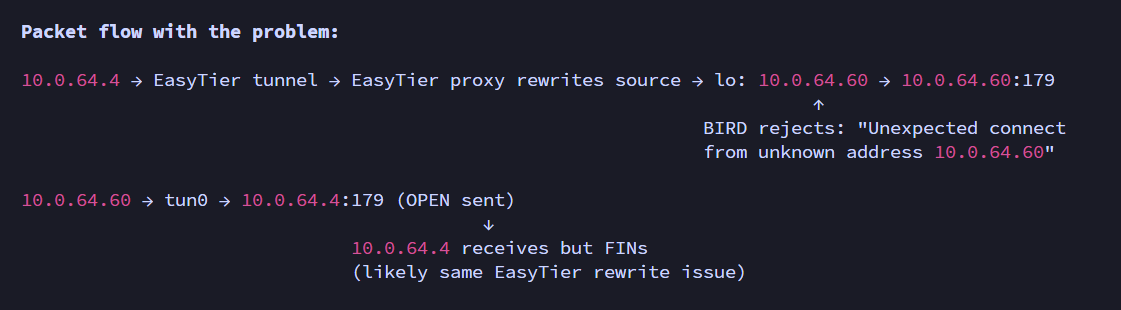
由此我们可以得知, 当某一方的 BGP 连接传入时, EasyTier 会先将 IP 数据包中的 源 IP 地址 改为本机隧道地址, 然后再被 BIRD 接收.
为了验证是不是为这个问题, 我们在 10.0.64.60 中查看 BIRD 的日志
root@SchoolNode-Main:/home/nanami114/PersonalFiles/easytier/configs# journalctl -xeu bird
Jun 04 17:50:58 SchoolNode-Main bird[2383741]: BGP: Unexpected connect from unknown address 10.0.64.60 (port 39138)
Jun 04 17:51:03 SchoolNode-Main bird[2383741]: BGP: Unexpected connect from unknown address 10.0.64.60 (port 56654)
Jun 04 17:51:07 SchoolNode-Main bird[2383741]: BGP: Unexpected connect from unknown address 10.0.64.60 (port 56670)
Jun 04 17:51:11 SchoolNode-Main bird[2383741]: BGP: Unexpected connect from unknown address 10.0.64.60 (port 56676)
Jun 04 17:51:15 SchoolNode-Main bird[2383741]: BGP: Unexpected connect from unknown address 10.0.64.60 (port 44306)
Jun 04 17:51:19 SchoolNode-Main bird[2383741]: BGP: Unexpected connect from unknown address 10.0.64.60 (port 44320)
Jun 04 17:51:23 SchoolNode-Main bird[2383741]: BGP: Unexpected connect from unknown address 10.0.64.60 (port 38916)
Jun 04 17:51:27 SchoolNode-Main bird[2383741]: BGP: Unexpected connect from unknown address 10.0.64.60 (port 38924)
Jun 04 17:51:31 SchoolNode-Main bird[2383741]: BGP: Unexpected connect from unknown address 10.0.64.60 (port 38930)
Jun 04 17:51:35 SchoolNode-Main bird[2383741]: BGP: Unexpected connect from unknown address 10.0.64.60 (port 37640)
Jun 04 17:51:40 SchoolNode-Main bird[2383741]: BGP: Unexpected connect from unknown address 10.0.64.60 (port 37656)
Jun 04 17:51:44 SchoolNode-Main bird[2383741]: BGP: Unexpected connect from unknown address 10.0.64.60 (port 48124)
Jun 04 17:51:49 SchoolNode-Main bird[2383741]: BGP: Unexpected connect from unknown address 10.0.64.60 (port 48128)
Jun 04 17:51:53 SchoolNode-Main bird[2383741]: BGP: Unexpected connect from unknown address 10.0.64.60 (port 55374)
Jun 04 17:51:58 SchoolNode-Main bird[2383741]: BGP: Unexpected connect from unknown address 10.0.64.60 (port 55388)
Jun 04 17:52:02 SchoolNode-Main bird[2383741]: BGP: Unexpected connect from unknown address 10.0.64.60 (port 39252)
Jun 04 17:52:07 SchoolNode-Main bird[2383741]: BGP: Unexpected connect from unknown address 10.0.64.60 (port 39266)
Jun 04 17:52:11 SchoolNode-Main bird[2383741]: BGP: Unexpected connect from unknown address 10.0.64.60 (port 39270)
Jun 04 17:52:15 SchoolNode-Main bird[2383741]: BGP: Unexpected connect from unknown address 10.0.64.60 (port 33950)
Jun 04 17:52:20 SchoolNode-Main bird[2383741]: BGP: Unexpected connect from unknown address 10.0.64.60 (port 33964)
Jun 04 17:52:24 SchoolNode-Main bird[2383741]: BGP: Unexpected connect from unknown address 10.0.64.60 (port 59404)
...
可以从日志中看到, BIRD 对 10.0.64.60 传入的连接进行了大量的报错, 由此我们得知, 问题就出在这里!
现在我们将这项功能关掉, 然后再次查看连接状态
root@SchoolNode-Main:/home/nanami114/PersonalFiles/easytier/configs# birdc s p
BIRD 2.18.1 ready.
Name       Proto      Table      State  Since         Info
device1    Device     ---        up     17:15:38.915
kernel_v4  Kernel     master4    up     17:15:38.915
kernel_v6  Kernel     master6    up     17:15:38.915
dn42_static_v4 Static     master4    up     17:15:38.915
dn42_static_v6 Static     master6    up     17:15:38.915
dn42_rpki_akix RPKI       ---        up     17:15:39.962  Established
ospf_dn42  OSPF       master4    up     17:15:38.915  Alone
ospf_dn42_v6 OSPF       master6    up     17:15:38.915  Alone
ibgp_homelab-subserver BGP        ---        up     17:54:48.504  Established
可以看到, 此时 iBGP 已经处于了 Established 状态. 至此, 问题全部解决.
结语
本人非专业网络运维, 如有错误或疏漏还请指出! 如果觉得文章不错, 还请分享给有需要的人, 感谢!