

OSPF Networking Based on Bird for New OpenWrt
Introduction
When configuring studio/enterprise networks, it is often necessary to implement interconnection between multiple network segments. These segments are typically at the same level or different levels, not in a hierarchical relationship, so they cannot directly communicate with each other. In such cases, we need to configure OSPF on the routers. This article will teach you how to implement OSPF networking on routers running OpenWrt.
Example Environment
- Main Router OS:
X-WRT 25.04_b202510240128 Plucky - Secondary Router OS:
X-WRT 26.04_b202601250827 Plucky
Following this guide requires you to have a basic understanding of the OSPF protocol
Getting Started
1. Install Bird
- Navigate to
System-->Softwarepage and install the two software packages as shown in the figure
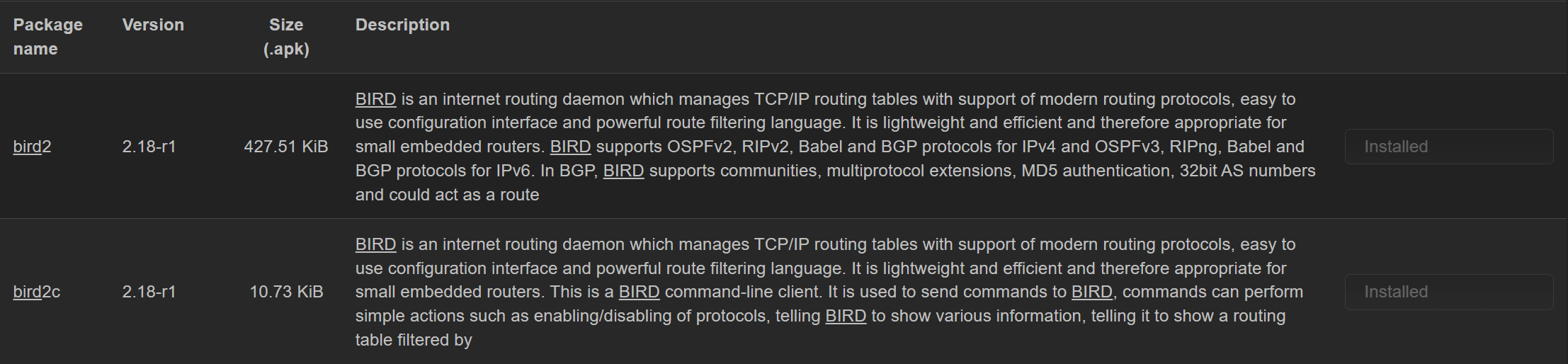
Q. Why not chooseBird 3?
A.Bird 2has been long-term verified by the community and is considered a stable and reliable choice, with a large number of actual configuration cases and troubleshooting experience. Moreover, Bird 2 almost meets the vast majority of network configuration requirements, without needing to use the new features of Bird 3.
2. Configure Bird
- Open the Bird configuration in
init.d
vim /etc/init.d/bird- Change
BIRD_CONF="/etc/bird.confto
BIRD_CONF="/etc/bird/bird.conf"- Create configuration folder and main configuration file
mkdir /etc/bird
vim /etc/bird/bird.conf- Fill in the configuration according to the following format
define INTRA_ROUTER_ID      = <your_router_id>;
define INTRA_PREFIX_V4      = [ <your_network_segments>/<netmask>+ ];
define INTRA_PREFIX_V6      = [ <your_network_segments>/<netmask>+ ];

protocol device {
    scan time 10;
};

ipv4 table intra_table_v4;
ipv6 table intra_table_v6;

include "config/defs.conf";
include "config/kernel.conf";
include "config/ospf.conf";
Configuration Item Explanation
INTRA_ROUTER_ID: The Router-ID of the current deviceINTRA_PREFIX_V4: Macro defining IPv4 internal network prefix
INTRA_PREFIX_v6: Macro defining IPv6 internal network prefixPrefix Naming Convention
- define INTRA_... # Internal routing related
- define INTER_... # External/boundary routing related
- define CUSTOMER_... # Customer routing related
- define PEERING_... # Peering routing related
scan time 10: Interface scanning interval is 10sipv4 table: IPv4 routing table nameipv6 table: IPv6 routing table name
include: Specifies which configuration files to include, you can add your own configuration files. The following are recommended configuration files to add
defs.conf: Can store functions such as routing entry filtering ruleskernel.conf: Stores filtering rules to be written into the kernel routing tableospf.conf: Configuration file for OSPF configuration
Example Configuration
define INTRA_ROUTER_ID      = 100.64.0.163;
define INTRA_PREFIX_V4      = [ 100.64.0.0/16+, 192.168.0.0/16+ ];
define INTRA_PREFIX_V6      = [ fd18:3e15:61d0::/48+ ];

protocol device {
    scan time 10;
};

ipv4 table intra_table_v4;
ipv6 table intra_table_v6;

include "intra/defs.conf";

include "intra/kernel.conf";
include "intra/ospf.conf";
- Create sub-configuration files and fill in the configuration according to the example format
The configuration files provided in this article are examples, it is highly recommended to write your own, you can use AI
mkdir infra
cd infra
defs.conf
vim defs.conffunction is_intra_net4() {
return net ~ INTRA_PREFIX_V4;
}
function is_intra_net6(){
return net ~ INTRA_PREFIX_V6;
}kernel.conf
vim kernel.confprotocol kernel intra_kernel_v4 {
kernel table 254;
scan time 20;
ipv4 {
table intra_table_v4;
import none;
export filter {
if source = RTS_STATIC then reject;
accept;
};
};
};
protocol kernel intra_kernel_v6 {
kernel table 254;
scan time 20;
ipv6 {
table intra_table_v6;
import none;
export filter {
if source = RTS_STATIC then reject;
accept;
};
};
};ospf.conf
vim ospf.confprotocol ospf v3 intra_ospf_v4 {
router id INTRA_ROUTER_ID;
ipv4 {
table intra_table_v4;
import where is_intra_net4() && source != RTS_BGP;
export where is_intra_net4() && source != RTS_BGP;
};
include "ospf/*";
};
protocol ospf v3 intra_ospf_v6 {
router id INTRA_ROUTER_ID;
ipv6 {
# table dn42_table_v6;
table intra_table_v6;
import where is_intra_net6() && source != RTS_BGP;
export where is_intra_net6() && source != RTS_BGP;
};
include "ospf/*";
};Configure OSPF
- Create OSPF related directories and configuration files
mkdir intra/ospf
vim intra/ospf/0.conf
OSPF configuration files can be named arbitrarily, but it is recommended to follow the naming convention <AreaID>.conf- Write the OSPF configuration file according to the following format
area 0.0.0.0 {
    interface "<lan_interface>" { stub; };
    interface "<ospf_interface>" {
        type <type>;
        cost <cost>;
        hello <time>;
        retransmit <time>;
        priority <num>;
        authentication <type>;
        ecmp weight <num>;
        bfd <yes/no>;
    };
};
Configuration Item Explanation
area: OSPF AreaIDinterface: Interface-specific configuration
stubinterface is a stub interface, which only accepts routing information but does not perform OSPF-related activities- Interfaces without any annotation are OSPF active interfaces, which will normally perform neighbor discovery and handshake
type: Interface network type
broadcast(default/recommended): Broadcast network. Suitable for broadcast media such as Ethernet/Token Ring. This mode electsDR/BDRand supports multiple routerspointopoint: Point-to-point network. Suitable forPPP,HDLC, point-to-point tunnels, does not electDR/BDR, establishes neighbors directlynonbroadcast: Non-Broadcast Multiple Access(NBMA). Suitable for Frame Relay,ATM,X.25, requires manual neighbor configurationpointomultipoint: Point-to-multipoint. Suitable for some mesh connections, simulatesNBMAas multiple point-to-point linksstub: Stub network, suitable for networks with only a single router, does not sendHello, does not form neighborscost: Interface cost. For internal networks, you can directly set it to1, for tunnel links such asVPN, it is recommended to set a slightly larger value, such as100
hello:Hellopacket transmission interval, in secondsIf the hello package transmission interval is different between neibours, then they won't be handshake successfully, so this value must be same between routers.retransmit: Retransmission interval, in secondsauthentication: OSPF authentication typeecmp weight: ECMP weightbfd: Whether to enable BFD support
Example Configuration
area 0.0.0.0 {
    interface "br-lan" { stub; };
    interface "zta7oqfzy6" {
        type broadcast;
        cost 100;
        hello 20;
    };
};
- After completing all the above configurations, restart Bird
/etc/init.d/bird restartVerification
- Use the following command to check the Bird status
birdc s p- If you see the OSPF protocol status as
Running, it indicates successful activation
intra_ospf_v4 OSPF       intra_table_v4 up     16:49:39.948  Running
intra_ospf_v6 OSPF       intra_table_v6 up     16:49:39.948  Running
Related Link
Conclusion
- I am not a professional in the networking field, if there are any errors, please point them out!
- If you find this article helpful, please share it with those who need it. Thank you!