

记录一则处理 systemd/journald 日志过多导致磁盘 I/O 爆炸及 systemd 处理缓慢的问题
前言
博主在使用自己开发的 super-frpc 项目时, 注意到每次程序启动的时候, 磁盘 I/O 都会被占满. 一开始博主以为是被攻击, 后面使用 htop 查询发现, 占用量最大的进程分别为 systemctl status superfrpc_* 和 journalctl -u superfrpc_* -n 50 --no-pager. 这两者的相同点是都会读取最近日志. 因此引出了本篇文章所需要解决的问题.
故障分析
为什么 systemctl status 也会造成大量 I/O 开销

首先, systemctl status * 并不会直接造成大量磁盘 I/O, 但是它会执行下面这些隐藏动作:
- 查询
unit状态 - 读取最近日志
(journalctl) - 显示最近几十行
stdout/stderr - 解析
cgroup/PID/ 状态信息
也就是说, 实际上 systemctl status * 隐式执行了
journalctl -u superfrpc_*.service -n 10为什么 journalctl 查询日志会造成大量 I/O 开销
众所周知, 正常情况下查询 systemd 服务日志应当是一瞬间的事情. 但如果你的日志符合以下任意一条特征:
- 该服务日志量巨大
- 日志没有被
rotate journal文件非常大journal已损坏- 日志开启了压缩
- 日志存储在机械盘
btrfs/zfs上有校验/压缩
那么, journald 就会疯狂读磁盘, 造成巨大 I/O 开销.
super-frpc 本身出了什么问题
- 主进程行为
在 super-frpc 的执行框架中, 如果用户开启了 watchdog 监听, 那么当主进程启动时, 会一并拉起 watchdog 进程, 然后检测现在已经开启的所有隶属于 super-frpc 的 frpc 服务进程, 并将已经启动的服务进程托管至 watchdog 进行监听. watchdog 行为
watchdog 在收到来自主进程的监听任务时, 会启动一个runMonitor的 goroutine. 在该函数中调用了一个checkServiceLogs的函数, 负责监听程序日志中的报错行为. 以下为修改前的checkServiceLogs函数代码func checkServiceLogs(serviceName string) (bool, error) { cmd := exec.Command("journalctl", "-u", serviceName, "-n", "50", "--no-pager") output, err := cmd.Output() if err != nil { return false, fmt.Errorf("failed to execute journalctl: %w", err) } logContent := string(output) errorKeywords := []string{"error", "fatal", "failed", "critical", "exception"} for _, keyword := range errorKeywords { if strings.Contains(strings.ToLower(logContent), keyword) { return false, nil } } return true, nil }可以看出, 这里调用了
journalctl对服务进行了日志的查询. 而这样的查询任务会在每一个新服务被添加到监听列表时都会执行一遍, 且是持续监听. 这也就导致了磁盘 I/O 爆炸.
故障排查
查询整个 journald 日志所占据的磁盘空间
nanami114@VM-Sub:~/PersonalFiles/super-frpc$ journalctl --disk-usage
Archived and active journals take up 4.0G in the file system.
可以看到, 光是日志就已经占据了 4.0G 的巨大空间, 这也就导致了 journald 读取日志时的大量磁盘开销. 同时也说明了本次博主所碰到的问题属于 服务日志量巨大
故障修复
临时删除不需要的日志
nanami114@VM-Sub:~/PersonalFiles/super-frpc$ sudo journalctl --vacuum-size=500M      # 将除最新的 500MB 日志以外的日志全部删除
Deleted archived journal /var/log/journal/e2bc53213dbb447bab4d9898e22776fa/system@cda8f901ce914c2ba110f7e17205bc58-0000000000f6d8ba-000650eb1f09e7db.journal (77.7M).
Deleted archived journal /var/log/journal/e2bc53213dbb447bab4d9898e22776fa/user-1000@cda8f901ce914c2ba110f7e17205bc58-0000000000f6daa3-000650eb2316285c.journal (3.6M).
Deleted archived journal /var/log/journal/e2bc53213dbb447bab4d9898e22776fa/system@cda8f901ce914c2ba110f7e17205bc58-0000000000f94f56-000650f2434e1d58.journal (80.5M).
Deleted archived journal /var/log/journal/e2bc53213dbb447bab4d9898e22776fa/system@cda8f901ce914c2ba110f7e17205bc58-0000000000fbc5fb-000650fa9502ddda.journal (78.6M).
Deleted archived journal /var/log/journal/e2bc53213dbb447bab4d9898e22776fa/user-1000@cda8f901ce914c2ba110f7e17205bc58-0000000000fdae6c-000650ff56ec6396.journal (3.6M).
Deleted archived journal /var/log/journal/e2bc53213dbb447bab4d9898e22776fa/system@cda8f901ce914c2ba110f7e17205bc58-0000000000fe3e79-00065100649d2f0e.journal (79.3M).
Deleted archived journal /var/log/journal/e2bc53213dbb447bab4d9898e22776fa/system@cda8f901ce914c2ba110f7e17205bc58-000000000100af6d-00065109684030a0.journal (78.8M).
Deleted archived journal /var/log/journal/e2bc53213dbb447bab4d9898e22776fa/user-1000@cda8f901ce914c2ba110f7e17205bc58-000000000100b5c6-000651097e126843.journal (3.7M).
Deleted archived journal /var/log/journal/e2bc53213dbb447bab4d9898e22776fa/system@cda8f901ce914c2ba110f7e17205bc58-0000000001032883-0006511015b880a5.journal (81.9M).
Deleted archived journal /var/log/journal/e2bc53213dbb447bab4d9898e22776fa/system@cda8f901ce914c2ba110f7e17205bc58-000000000105a875-0006511658dceb30.journal (78.1M).
Deleted archived journal /var/log/journal/e2bc53213dbb447bab4d9898e22776fa/system@cda8f901ce914c2ba110f7e17205bc58-0000000001081e15-0006511f823b08c7.journal (83.9M).
Deleted archived journal /var/log/journal/e2bc53213dbb447bab4d9898e22776fa/user-1000@cda8f901ce914c2ba110f7e17205bc58-000000000108b2c0-00065121421f3acb.journal (3.6M).
...
Vacuuming done, freed 3.5G of archived journals from /var/log/journal/e2bc53213dbb447bab4d9898e22776fa.
Vacuuming done, freed 0B of archived journals from /var/log/journal.
Vacuuming done, freed 0B of archived journals from /run/log/journal.
限制
journald日志创建大小
编辑/etc/journal/journald.conf
将SystemMaxUse,SystemMaxFileSize,RuntimeMaxUse这三条参数取消注释, 并按照自己的需求设置. 这里博主分别设置为500M,50M,100M. 完整的配置文件如下[Journal] #Storage=auto #Compress=yes #Seal=yes #SplitMode=uid #SyncIntervalSec=5m #RateLimitIntervalSec=30s #RateLimitBurst=10000 SystemMaxUse=500M #SystemKeepFree= SystemMaxFileSize=50M #SystemMaxFiles=100 RuntimeMaxUse=100M #RuntimeKeepFree= #RuntimeMaxFileSize= #RuntimeMaxFiles=100 #MaxRetentionSec= #MaxFileSec=1month #ForwardToSyslog=no #ForwardToKMsg=no #ForwardToConsole=no #ForwardToWall=yes #TTYPath=/dev/console #MaxLevelStore=debug #MaxLevelSyslog=debug #MaxLevelKMsg=notice #MaxLevelConsole=info #MaxLevelWall=emerg #LineMax=48K #ReadKMsg=yes #Audit=yes保存并重启
journaldsystemctl restart systemd-journald
程序代码修复
systemd 配置文件问题
造成问题的核心原因是, super-frpc 在创建 frpc 服务时, 并没有对日志方面做出任何配置. 在询问 AI 后, 得到的答复是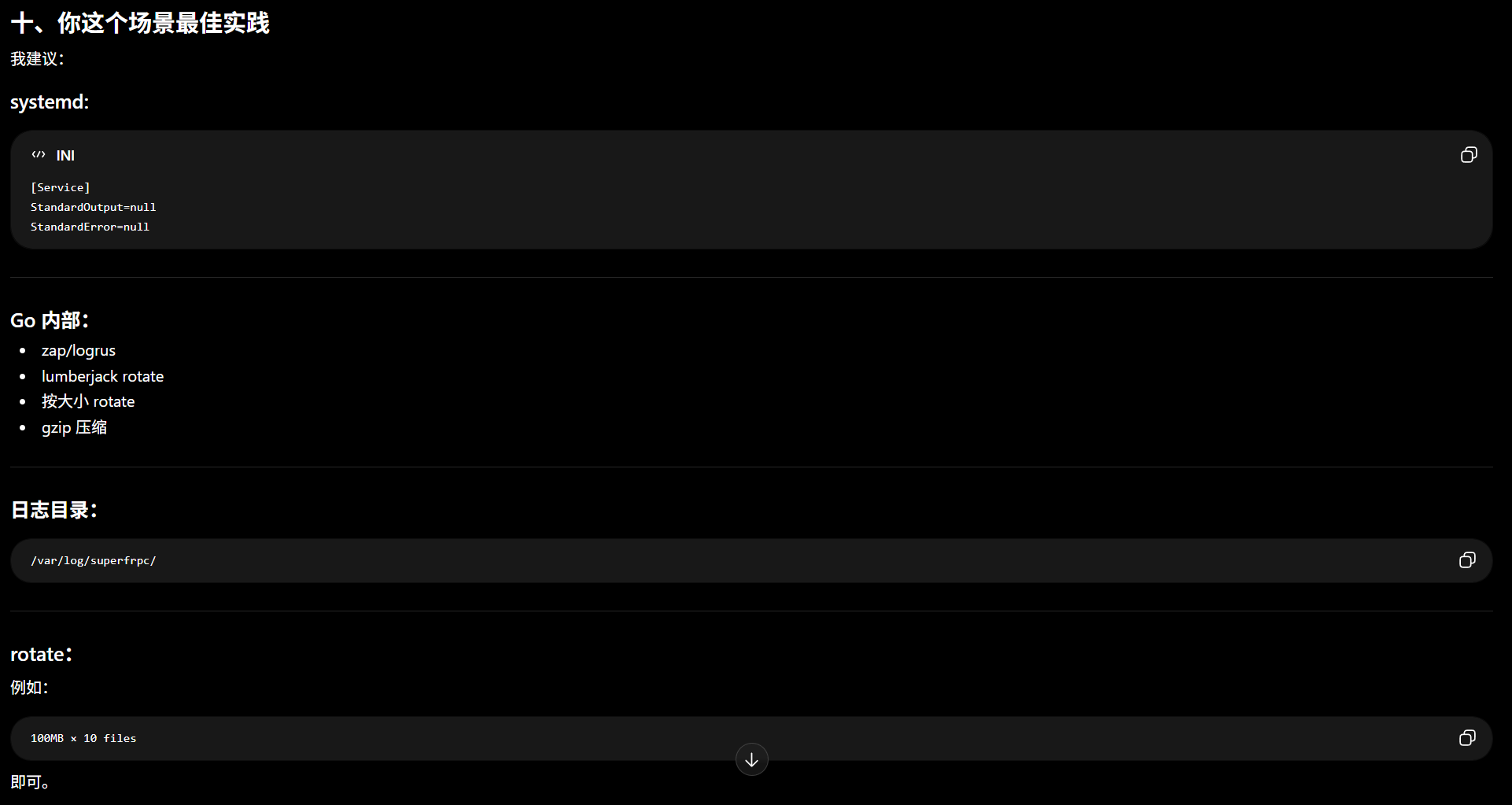
这里我们先来看一下原来的代码是怎么写的
func createSystemdService(instanceID int, configPath, runUser string) error {
    frpcPath, err := GetFrpcPath()
    if err != nil {
        return err
    }

    serviceName, err := database.GetServiceNameByInstanceID(instanceID)
    if err != nil {
        return err
    }

    serviceContent := fmt.Sprintf(`[Unit]
Description=superfrpc_%d
After=network.target

[Service]
Type=simple
ExecStart=%s -c %s
User=%s
Restart=on-failure
RestartSec=5

[Install]
WantedBy=multi-user.target
`, instanceID, frpcPath, configPath, runUser)

    servicePath := filepath.Join("/etc/systemd/system", serviceName+".service")
    if err := os.WriteFile(servicePath, []byte(serviceContent), 0644); err != nil {
        return fmt.Errorf("failed to create systemd service file: %w", err)
    }

    cmd := exec.Command("systemctl", "enable", serviceName)
    if output, err := cmd.CombinedOutput(); err != nil {
        os.Remove(servicePath)
        return fmt.Errorf("failed to enable service: %s, output: %s", err, output)
    }

    cmd = exec.Command("systemctl", "daemon-reload")
    if output, err := cmd.CombinedOutput(); err != nil {
        return fmt.Errorf("failed to reload daemon: %s, output: %s", err, output)
    }

    return nil
}
在这段代码中, systemd 服务的配置文件模板为
[Unit]
Description=superfrpc_%d
After=network.target

[Service]
Type=simple
ExecStart=%s -c %s
User=%s
Restart=on-failure
RestartSec=5

[Install]
WantedBy=multi-user.target
可以看到, 没有对日志做出任何配置. 这里我们添加上如下两条配置
StandardOutput=append:%s/superfrpc_%d.log
StandardError=append:%s/superfrpc_%d.log
并在程序配置文件中新增了 logsPath 这条参数, 用于单独存放 frpc 产生的日志.
日志无限增长问题
将 frpc 日志重定向到文件输出之后, 还有一个问题需要解决: 日志无限增长.
systemd 自己并不会主动清理日志文件, 所以我们需要借助 logrotate 工具来对日志进行约束. 详细解决流程如下
在主进程创建首个
systemd服务后, 创建logrotate配置/etc/logrotate.d/superfrpc_frpclog在配置中填写以下字段
/path/to/logs/superfrpc_*.log { daily rotate 7 compress delaycompress missingok notifempty copytruncate }/path/to/logs/superfrpc_*.log: 匹配符合/path/to/logs/superfrpc_*.log的所有文件daily: 每天进行一次 rotaterotate 7: 保留 7 份历史日志compress: 旧日志自动进行gzip压缩delaycompress: 延迟一轮再压缩missingok: 日志不存在也不报错nofityempty: 空日志不归档copytruncate: 将日志文件inode属性进行迁移
进行了 logrotate 配置后, 整个日志的 rotate 过程如下:
假设当前日志文件
superfrpc_8.log的大小达到了500MB, 则执行 rotate:
Day 1:superfrpc_8.log # 新日志文件 superfrpc_8.log.1到了第二天, 自动 rotate 一遍:
Day 2:superfrpc_8.log # 新日志文件 superfrpc_8.log.1 # 延迟一轮再压缩 superfrpc_8.log.2.gz # 被 gzip 压缩- 到了第八天, 删除最开始的一条日志:
superfrpc_8.log.7.gz
修改后的代码如下
创建 CreateLogrotatePolicy 函数
func CreateLogrotatePolicy() error {
    logrotatePath := "/etc/logrotate.d/superfrpc_frpclog"
    policyContent := fmt.Sprintf(`%s/superfrpc_*.log {
    daily
    rotate 7
    compress
    delaycompress
    missingok
    notifempty
}
`, global.CurrentConfig.LogsPath)
    if err := os.WriteFile(logrotatePath, []byte(policyContent), 0644); err != nil {
        return fmt.Errorf("failed to create logrotate policy file: %w", err)
    }

    if err := exec.Command("logrotate", "-f", logrotatePath).Run(); err != nil {
        return fmt.Errorf("failed to apply logrotate policy: %w", err)
    }
    return nil
}
然后在程序初始化过程中调用该函数
if global.CurrentConfig.LogsPath != "" && !global.CurrentConfig.Status.IsLogrotateConfigured { // Set up logrotate policy if LogsPath is configured
    if err := sys.CreateLogrotatePolicy(); err != nil {
        postLog.Fatal(fmt.Sprintf("Failed to create logrotate policy: %v", err))
    } else {
        global.CurrentConfig.Status.IsLogrotateConfigured = true
        config.SaveConfig()
        postLog.Info("Logrotate policy has been configured successfully.")
    }
}
测试修复效果
root@VM-Sub:/home/nanami114/PersonalFiles/super-frpc# ./super-frpc
2026/05/22 17:15:16 [frpLogger] Init.d log streamer initialized
2026/05/22 17:15:16 [frpLogger] Systemd log streamer initialized
[2026-05-22 17:15:16.541 - INFO] Super-frpc 0.0.1 (Build 1.pre-release) by Madobi Nanami
[2026-05-22 17:15:16.549 - INFO] Logs database initialized successfully
[2026-05-22 17:15:16.558 - INFO] Database initialized successfully
[2026-05-22 17:15:16.565 - INFO] Routes setup successfully
[2026-05-22 17:15:16.588 - INFO] Watchdog process watchdog_systemd is not running, starting it...
[2026-05-22 17:15:16.797 - DEBUG] [GetServiceNameByInstanceID] instanceID: 8, serviceName: superfrpc_8
[2026-05-22 17:15:16.864 - INFO] [IsInstanceRunning] Systemd service superfrpc_8 is running
[2026-05-22 17:15:16.870 - DEBUG] [GetServiceNameByInstanceID] instanceID: 8, serviceName: superfrpc_8
[2026-05-22 17:15:16.878 - DEBUG] [watchdog] Add service monitor: superfrpc_8
[2026-05-22 17:15:16.885 - DEBUG] [GetServiceNameByInstanceID] instanceID: 9, serviceName: superfrpc_9
[2026-05-22 17:15:16.903 - INFO] [IsInstanceRunning] Systemd service superfrpc_9 is running
[2026-05-22 17:15:16.909 - DEBUG] [GetServiceNameByInstanceID] instanceID: 9, serviceName: superfrpc_9
[2026-05-22 17:15:16.916 - DEBUG] [watchdog] Add service monitor: superfrpc_9
[2026-05-22 17:15:16.923 - DEBUG] [GetServiceNameByInstanceID] instanceID: 10, serviceName: superfrpc_10
[2026-05-22 17:15:16.940 - INFO] [IsInstanceRunning] Systemd service superfrpc_10 is running
[2026-05-22 17:15:16.946 - DEBUG] [GetServiceNameByInstanceID] instanceID: 10, serviceName: superfrpc_10
[2026-05-22 17:15:16.952 - DEBUG] [watchdog] Add service monitor: superfrpc_10
[2026-05-22 17:15:16.959 - DEBUG] [GetServiceNameByInstanceID] instanceID: 11, serviceName: superfrpc_11
[2026-05-22 17:15:16.976 - INFO] [IsInstanceRunning] Systemd service superfrpc_11 is running
[2026-05-22 17:15:16.982 - DEBUG] [GetServiceNameByInstanceID] instanceID: 11, serviceName: superfrpc_11
[2026-05-22 17:15:16.988 - DEBUG] [watchdog] Add service monitor: superfrpc_11
[2026-05-22 17:15:16.995 - DEBUG] [GetServiceNameByInstanceID] instanceID: 12, serviceName: superfrpc_12
[2026-05-22 17:15:17.012 - INFO] [IsInstanceRunning] Systemd service superfrpc_12 is running
[2026-05-22 17:15:17.018 - DEBUG] [GetServiceNameByInstanceID] instanceID: 12, serviceName: superfrpc_12
[2026-05-22 17:15:17.024 - DEBUG] [watchdog] Add service monitor: superfrpc_12
[2026-05-22 17:15:17.031 - INFO] [watchdog] synced 5 running instance(s) to monitor list
[2026-05-22 17:15:17.037 - INFO] Connected to Watchdog successfully
[2026-05-22 17:15:17.045 - INFO] Server starting on 0.0.0.0:7000
从日志中可以看出, 此时查询 systemctl status 的速度已经很快了, 然后查询磁盘 I/O 占用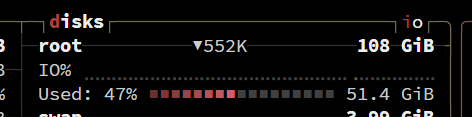
可以看到, 磁盘 I/O 几乎没有占用.
至此, 问题全部解决
结语
通过此次故障的发生, 我们需要加强对服务日志的管控以及对程序潜在 bug 的审查. 感谢您的阅读, 如果觉得不错, 还请分享给有需要的人, 感谢! 如有错误或疏漏, 还请指出, 感谢!